Make Sense of Complex Documents
Eno is a desktop app for research in PDFs and Word files. Search a folder, chart a table, export to Excel, or ask a question and see the source.
We'll send you a link to install Eno on your Mac or PC

Made for
* Or anyone working with complex documents
Why Eno PDF?
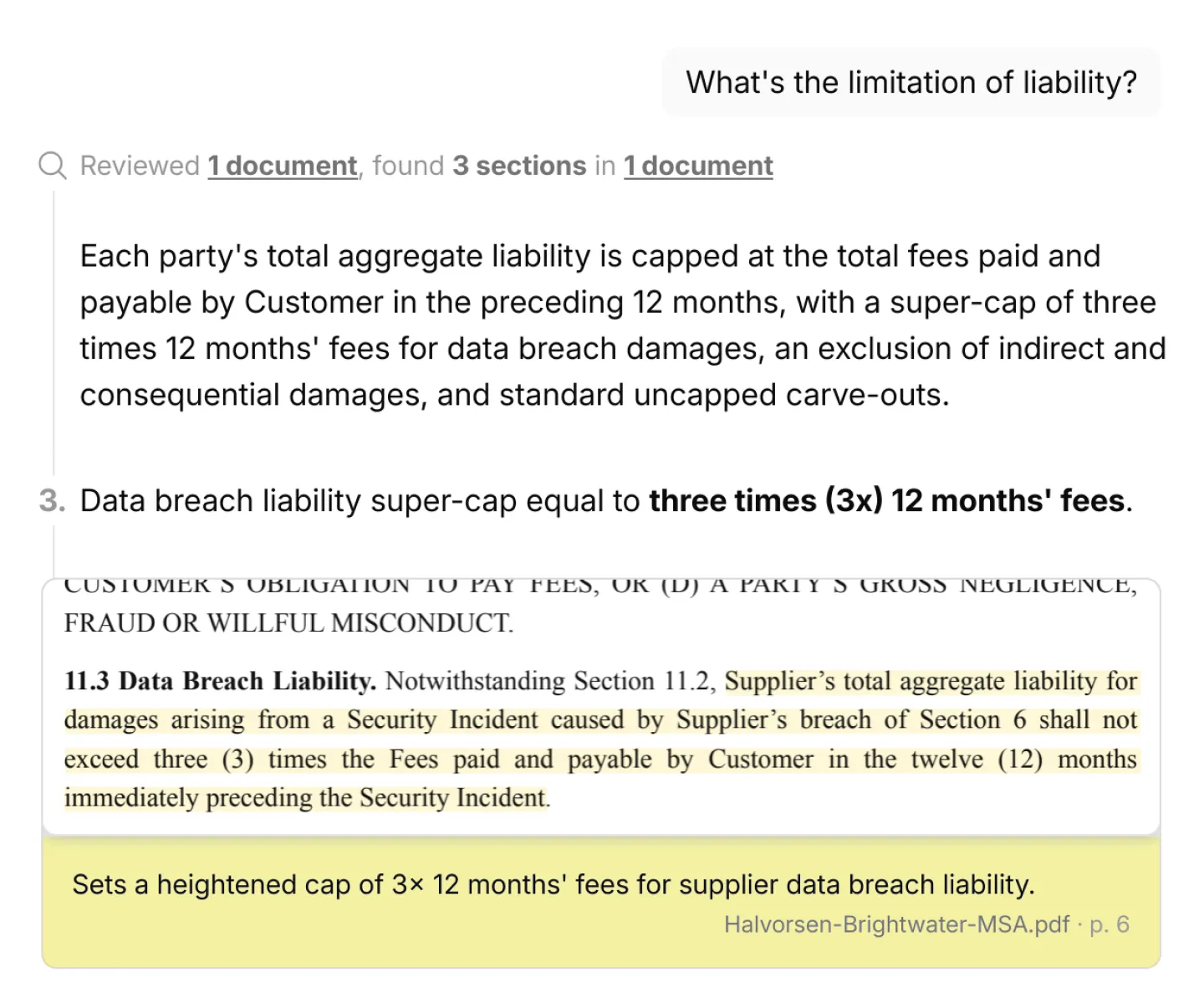
AI for work where mistakes cost you
Every answer comes with a visual citation from the source page, so you can confirm accuracy.
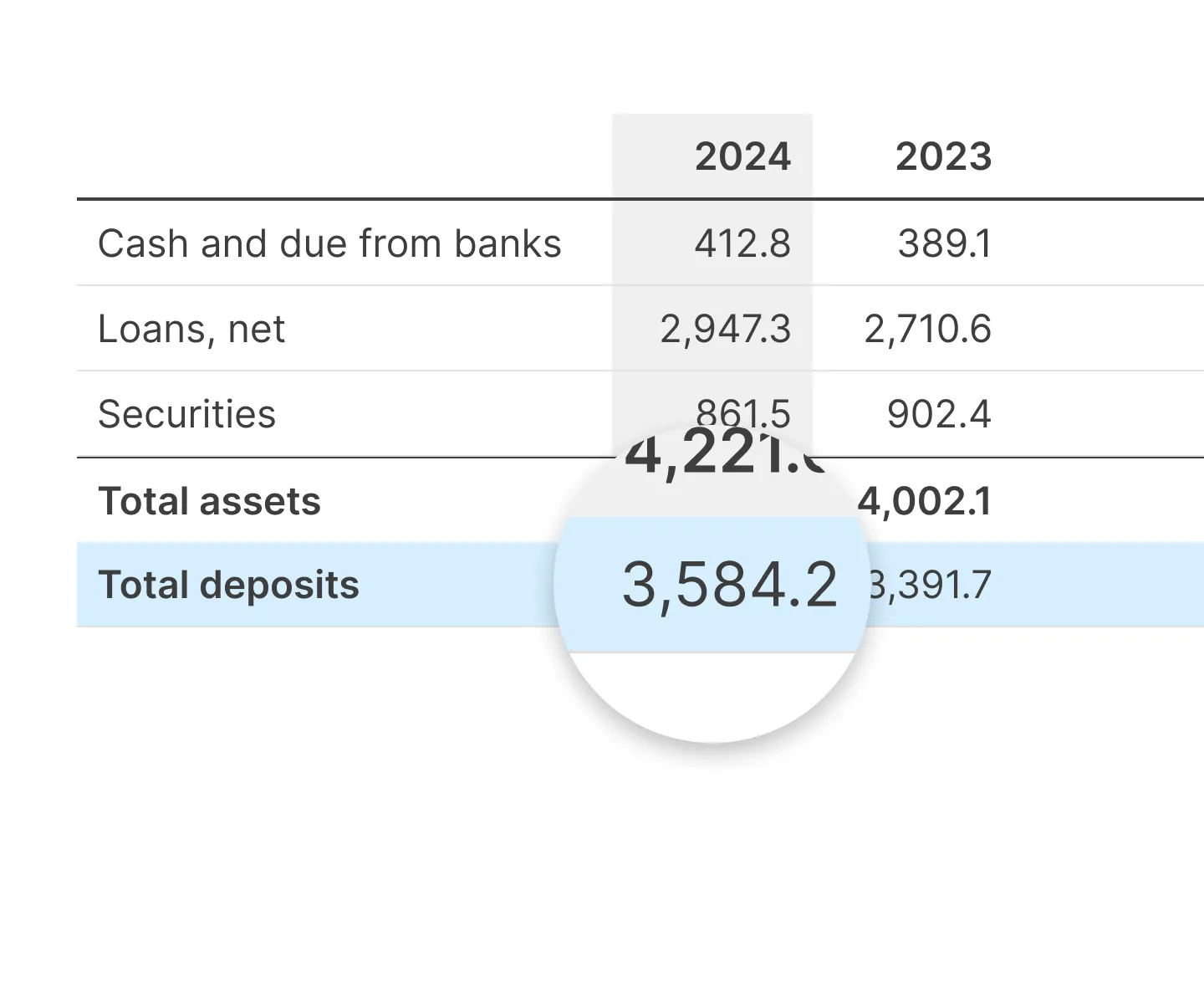
Best-in-class table support
Ask questions about tables, chart them, or paste them into Excel with structure intact.
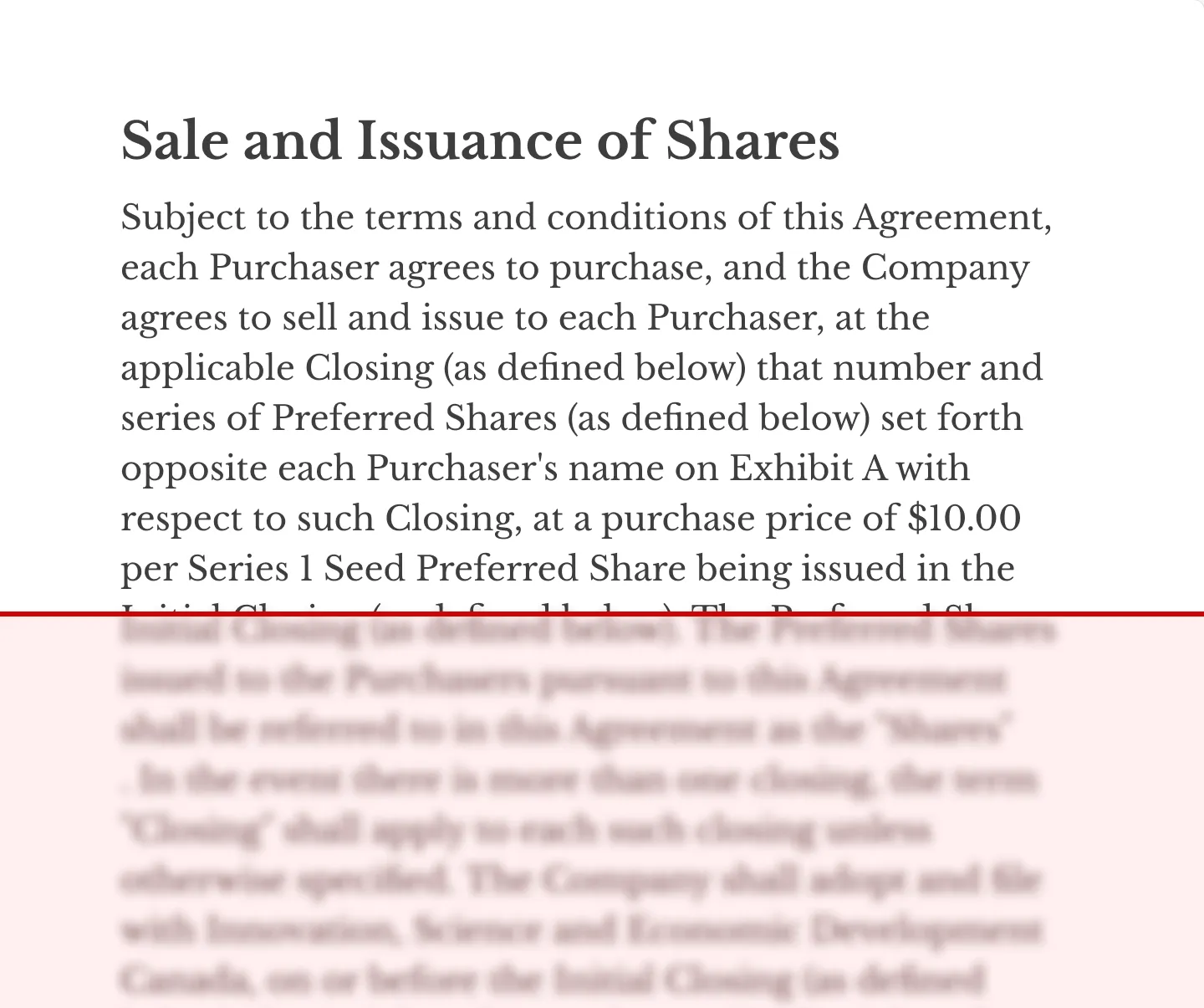
Read scanned PDFs, free
Eno reads scanned pages, so you can search them like any other PDF.
Integrations
Search documents from your preferred storage provider.



Security
ENO VS AI Chatbots
Provides visual citations with every answer, so you can verify claims yourself.
Paraphrases, with no clear way to trace a claim back to the page.
Opens files and folders straight from your computer, with nothing to re-upload.
Makes you upload documents into each chat or project, and keeps them in the cloud.
Handles thousand-page files and folders full of documents.
Struggles with long documents and large sets of files.
Eno vs PDF Readers
AI Question & Answer
Verify AI answers for accuracy
Visual citations provided with every answer, with a link to the relevant passage
Numbered citations that link to the relevant passage
Numbered citations that link to the relevant passage
Ask questions across many documents at once
Yes
Requires separate PDF Spaces app
Requires separate Workspace app
Integrations
Box, Clio, and Google Drive
Box, Dropbox, Google Drive, OneDrive, and Microsoft apps
Notion, Asana, Atlassian, HubSpot, Figma, and more
AI search price
Pay-as-you-go
Monthly subscription
Monthly subscription
Reading Documents
OCR for scanned pages
✅ Free
💰 Paid plan
💰 Paid plan
Extract table data to spreadsheet
✅ Free
💰 Paid plan
💰 Paid plan
Convert PDF tables to charts
✅ Free
💰 Paid plan with PDF Spaces app
💰 Paid plan with Workspace app
Navigate by table index
✅ Free
❌️
❌️
Split document view
✅ Free. Up to eight panes, across different documents
✅ Free. Up to two panes, in a single window
✅ Free. Up to two panes, in a single window
File support
PDF, Word (.docx), Markdown (.md), Outlook (.msg)
PDF, with conversion of Word, Excel, PowerPoint, images, TXT, HTML, and more
PDF, with conversion of Word, Excel, PowerPoint, images, TXT, HTML, and more
Application size
Less than 50 MB
1.4 GB
956 MB
Won't pester you with in-app marketing and upsells
✅
❌️
❌️
Don't take our word for it
“Ask eno a question and it shows you the answer. It does not tell you. It saves you the time of searching, but leaves you to review and analyze the data yourself.”

John M.
Litigator
“eno excels at quickly surfacing the provisions I need to answer a question, even when they are spread across a complex set of corporate agreements. I love how I can read the exact text of the provisions, allowing me to complete my own analysis of how they operate.”

Lyndsey K.
In-House Counsel
“eno lets me instantly pinpoint where lease language diverges from the agreed LOI. Other AI tools give summaries that require verification — eno shows the exact language differences, eliminating ambiguity. In a competitive New York leasing environment, that clarity in real time means faster decisions and smoother negotiations.”

Nicholas H.
Director - Commercial Real Estate

You're holding it wrong
Using AI without AI using you
Like an uninvited houseguest, AI has slipped into our daily routines with startling ease. In You're Holding It Wrong, we explore:
- How the technology works, so you can make sense of its output.
- The risks of using AI carelessly.
- How you can get more out of AI by asking it for less.
Frequently Asked Questions
Who is Eno for?
Eno was built for people who work with large collections of complex documents and demand accuracy. Eno uses AI to find answers to difficult questions. It is able to reason over complex chains of interactions in documents such as contracts or statutes. Eno's evidence-based approach to AI places an emphasis on surfacing actual sections from your documents, rather than forcing you to rely on long-winded AI responses with vague citations.
Typical customers are lawyers, engineers, academics, or other knowledge work professionals.
How is Eno different from ChatGPT or other AI PDF tools?
Eno shows you the exact passages behind every answer, so you can verify accuracy yourself. Other tools give you an answer, but there is no direct thread between that answer and the source document.
See the side-by-side comparisons: Eno vs NotebookLM and Eno vs Adobe Acrobat.
Does Eno hallucinate?
How do I get Eno?
Can Eno search across multiple PDFs or thousand-page files?
Can Eno handle scanned PDFs?
What file types does Eno support?
Can I use Eno with an LLM I already subscribe to?
Who built Eno?
We'll send you a link to install Eno on your Mac or PC

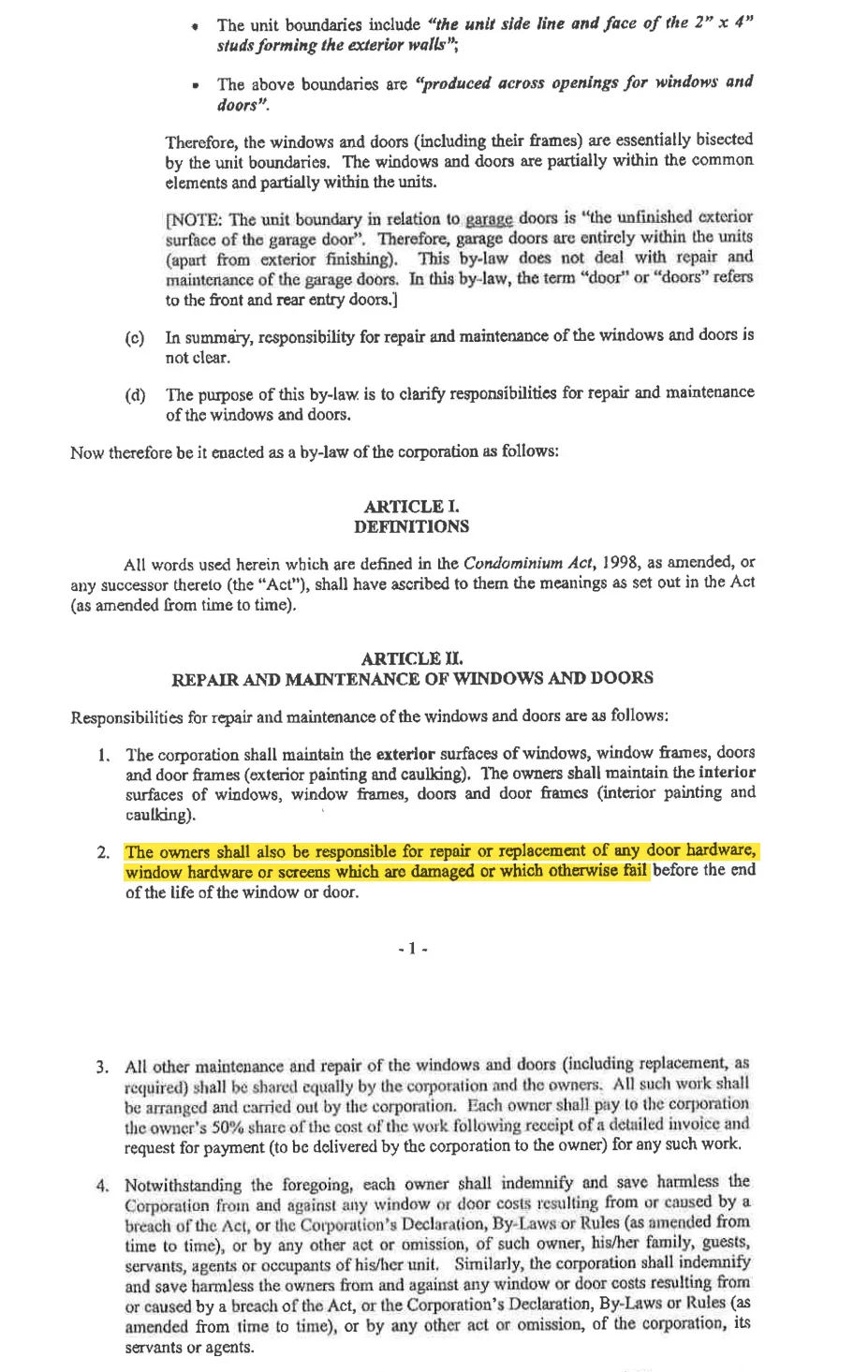
Who is responsible for replacing broken hardware on windows?
Reviewed 7 documents, found 1 section in 1 document
The unit owners are responsible for repairing or replacing broken or damaged window hardware that fails before the end of the window’s life.
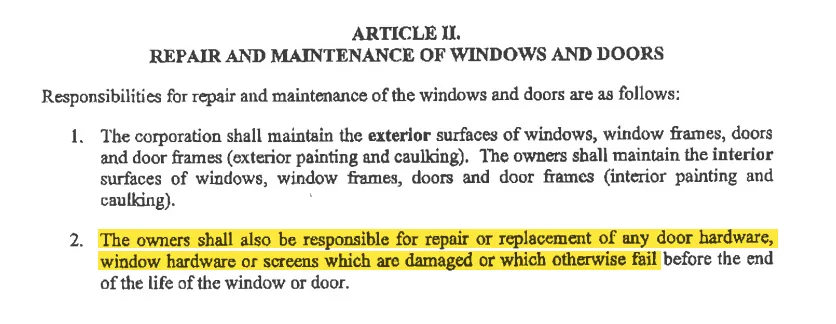
Explicitly assigns responsibility for repairing or replacing damaged or failed window hardware to the owners.
by-law-4 • p. 7